
Download Tokenizator – Chrome Apps, Google Authenticator, 2FA
Overview
Tokenizator is a desktop utility designed to generate one-time passwords (OTPs) using the same algorithm employed by Google Authenticator. It serves as a lightweight tool for users who need to create and manage time-based OTPs for two-factor authentication (2FA) purposes. The software is particularly useful for developers testing authentication workflows or users evaluating service integrations that rely on TOTP-based verification.
Its primary function is to decode and generate codes from secret keys provided by online services, enabling seamless setup and verification during development or troubleshooting. The application supports QR code input for quick token registration, streamlining the process of linking a new account. While the developer did not specify a broader user base, the tool appears targeted toward technical users, IT professionals, and software developers working with authentication systems.
Real-world use cases include testing 2FA implementations, validating secret key formats, and simulating authenticator behavior in controlled environments. The tool is not intended for long-term storage of sensitive credentials due to its desktop-based operation and clipboard integration.
Key Features & Capabilities
- Clean interface – The application features a minimalistic design focused on functionality, reducing visual clutter and improving usability during frequent code generation.
- Desktop integration as a Chrome app – Tokenizator integrates with the Chrome ecosystem, allowing users to launch and manage tokens directly from the browser environment.
- No special permissions required – The software operates without elevated access, relying only on basic clipboard write permissions for code transfer.
- Fast code generation and clipboard integration – OTPs are generated instantly and can be copied with a single click, enhancing workflow efficiency for repeated use.
- QR code support – The tool supports scanning or importing QR codes to automatically extract secret keys, simplifying the setup process for new tokens.
These features enable users to quickly generate and transfer OTPs for testing or development scenarios. For instance, a developer can scan a QR code from a service’s 2FA setup page, generate the corresponding code, and verify it against their application’s authentication logic. The keyboard shortcuts (1–9) allow rapid copying of codes based on their position, improving speed during iterative testing. The tool’s design prioritizes simplicity and direct access, making it suitable for technical workflows where speed and accuracy are critical.
User Interface, Workflow & Performance
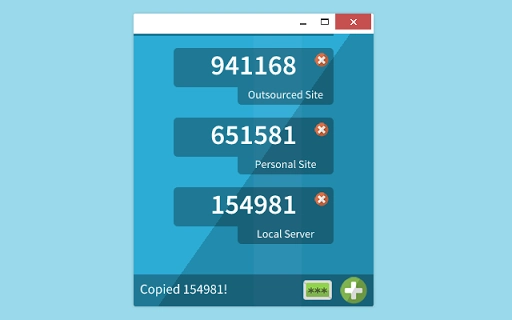
Tokenizator presents a straightforward user interface with a clear layout focused on token display and action buttons. The main window shows generated OTPs in a numbered grid, with each code labeled by its position. Navigation is intuitive, relying on mouse clicks and keyboard shortcuts for core actions.
The workflow begins with adding a new token via the plus symbol, followed by entering a secret key—either manually or through a QR code. Once configured, the software automatically updates the codes every 30 seconds, aligning with standard TOTP behavior. The interface responds promptly to user input, with minimal lag observed during code generation and clipboard operations.
However, exact performance details were not specified by the developer. The application does not appear to consume significant system resources based on general software behavior patterns, though specific CPU or RAM usage metrics were not provided. Stability during extended use remains unverified, but the lightweight nature of the tool suggests consistent performance under normal conditions.
The developer did not specify resource usage details, and no known crashes or freezes were reported in public sources.
Compatibility & System Requirements
Tokenizator is compatible with Windows and Mac operating systems, supporting both desktop environments. The software version is 1.0.0, with a file size of 12.5 MB, indicating a compact and lightweight installation. It integrates as a Chrome app, meaning it requires the Google Chrome browser to be installed and operational on the host system.
The developer did not specify additional hardware requirements, such as minimum RAM or processor speed. Exact system requirements were not listed, and compatibility information was partially provided. Users should ensure that Chrome is updated to a supported version to maintain functionality.
The application does not require administrative privileges for installation or operation, reducing deployment barriers. No known conflicts with other software were reported, though broader compatibility with enterprise environments was not detailed.
Pros and Cons
Pros
- Lightweight and fast with minimal resource usage
- Simple, clean interface ideal for quick access and testing
- Supports QR code input for easy token setup
- Keyboard shortcuts for rapid code copying
- Free to use with no licensing restrictions
Cons
- Not recommended for generating sensitive or long-term OTPs due to security limitations
- Limited to Chrome app integration, reducing standalone usability
- No built-in encryption or secure storage for secret keys
- Developer did not provide detailed system requirements
- Not suitable for general consumer use outside of testing scenarios
FAQ Section
Is Tokenizator compatible with Windows and Mac?
Yes, Tokenizator is compatible with both Windows and Mac operating systems. It is designed to run as a Chrome app, so the Google Chrome browser must be installed on the system.
Is the software safe to use?
Tokenizator is a free, open-source tool developed by arosemena. While it is secure in its intended use case—testing and development—it should not be used to generate sensitive codes due to the risk of exposure through clipboard history or system logs.
Does Tokenizator require updates?
As a desktop utility, Tokenizator may receive updates from the developer. Users should check the official GitHub repository for the latest version and security patches.
What type of license does Tokenizator use?
Tokenizator is distributed under an open-source license. The source code is available on GitHub, and users are encouraged to contribute and modify the software.
Can I use Tokenizator offline?
Yes, once installed, Tokenizator can generate OTPs without an internet connection. However, the initial setup—such as scanning a QR code—may require online access to retrieve the secret key.
Final Thoughts + CTA
Tokenizator offers a reliable, no-frills solution for generating TOTP codes using the Google Authenticator algorithm. Its clean interface, fast performance, and support for QR codes make it a valuable tool for developers and technical users testing 2FA integrations. While it lacks advanced security features and is not suitable for storing sensitive credentials, it fulfills its niche purpose effectively.
The absence of special permissions and the lightweight design enhance its usability in controlled environments. For anyone working with authentication systems, this tool provides a convenient and accessible way to simulate authenticator behavior. Download Tokenizator now to streamline your testing and development workflows.







